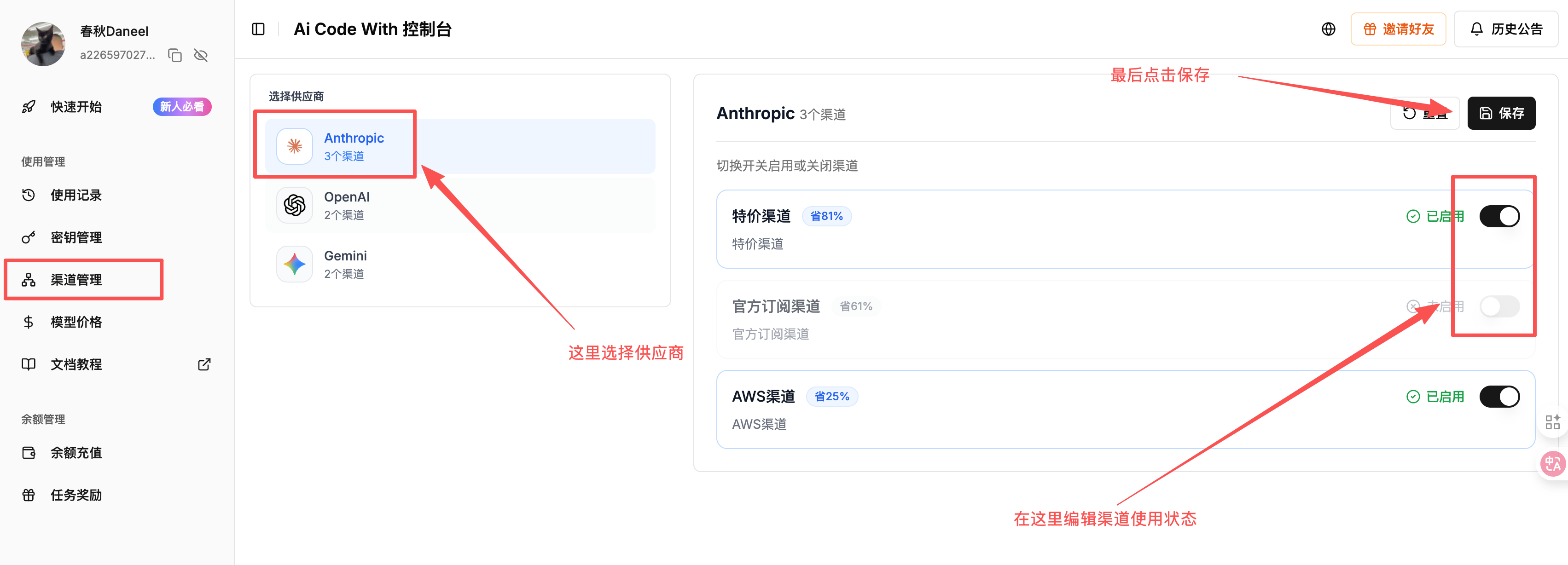
Channel management
Understand discounted and fallback channels, choose providers, and save channel settings.
1. Why is there a channel management feature?
Start with the reason behind the design:
Understanding channel stability
To reduce prices, the platform divides large provider resource packages into smaller allocations. This aims to use the whole package rather than leaving part of its quota unused.
High utilization can trigger upstream risk controls. Those controls can affect channel availability. This is a tradeoff of low-cost resources, rather than a deliberate reduction in the quality of discounted channels.
To reduce dependence on a single resource, UniRoute uses a mix of multiple channels.
2. How does channel selection help reduce costs?
The platform connects several underlying resources, including provider subscriptions, AWS, and discounted channels, to provide fallback options when a channel becomes unavailable.
Automatic routing
The routing strategy is price first, with automatic fallback.
- Lower cost first: when discounted channels are enabled, the system prioritizes the cheapest available channel.
- Automatic failover: when an inexpensive channel becomes unavailable because of upstream controls, the system switches to a more expensive backup channel to help keep the coding request running.
- Switch back: when the cheaper channel recovers, the system returns to it to reduce costs.
With channels enabled, the system selects the less expensive available option, uses a backup during an outage, and returns to the cheaper option after recovery.
3. Why can I disable channels manually?
Although discounted channels offer lower prices, you may notice a difference in model behavior or find their results less suitable for a complex task. You can choose which channels to allow.
Choosing channels
For lower cost, the default recommendation: keep both discounted and other channels enabled and let the system route requests.
For stricter quality requirements: if you prefer to pay more rather than experience fluctuations from upstream risk controls, disable the discounted channel and leave only the official or AWS channels enabled.
4. Change your settings
- Select the model provider you want to configure, such as
AnthropicorOpenAI, in the left navigation. - Use the switches in the right-hand list to enable or disable individual channels.
- Click Save at the upper right.
Remember to save
After changing a switch, click Save at the upper right. Changes do not take effect until you save them.