Loading model…正在加载模型详情…

 OpenAI
Create images with OpenAI's GPT Image 2.5, choosing Flare or Sunburst to explore detailed, carefully composed visuals from text.
- From $0.02 / image
- 1K to 4K
- 1:1 or 16:9
Examples
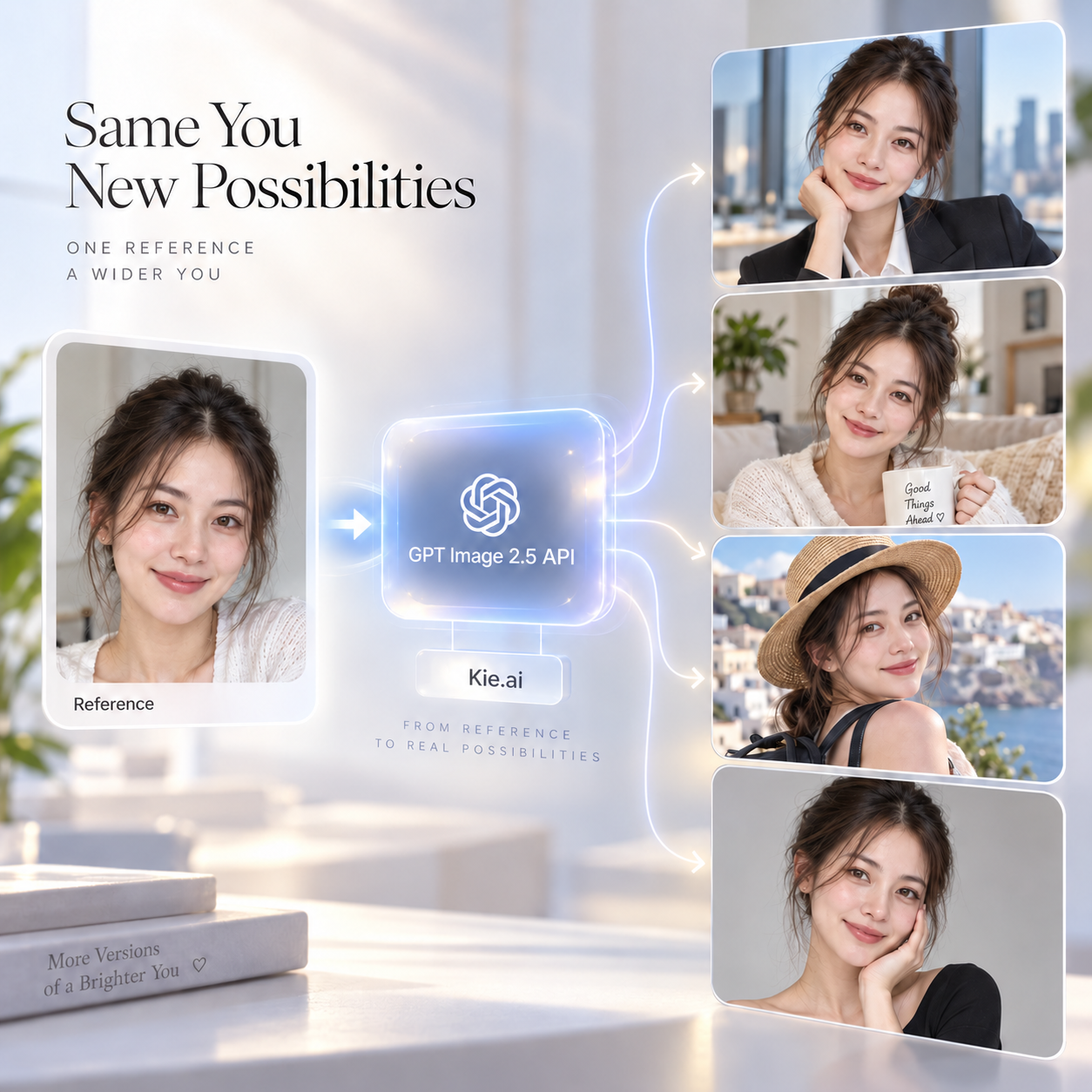
Design a premium reference-based creation showcase centered on GPT Image 2.5 API and {{appName}}. Show one clear reference portrait feeding into several polished generated results that preserve the same person while changing clothing, setting, styling, or composition. Use elegant visual connectors, subtle transformation cues, and refined interface layers to suggest that {{appName}} carries the reference into GPT Image 2.5 API and returns consistent outputs. Emphasize recognizable facial identity, natural skin detail, realistic lighting, and strong visual continuity. Keep {{appName}} understated and let the image transformations communicate the capability.

Create a sophisticated contemporary event poster with a bold central headline area, one strong visual focal point, a clearly separated date and venue section, and carefully organized decorative elements. Use expressive typography, layered paper shapes, abstract photography, and a refined editorial grid. Keep the information hierarchy clear and visually balanced, with strong spacing and no dense blocks of small text. The final design should feel professionally art-directed and ready for a real campaign.
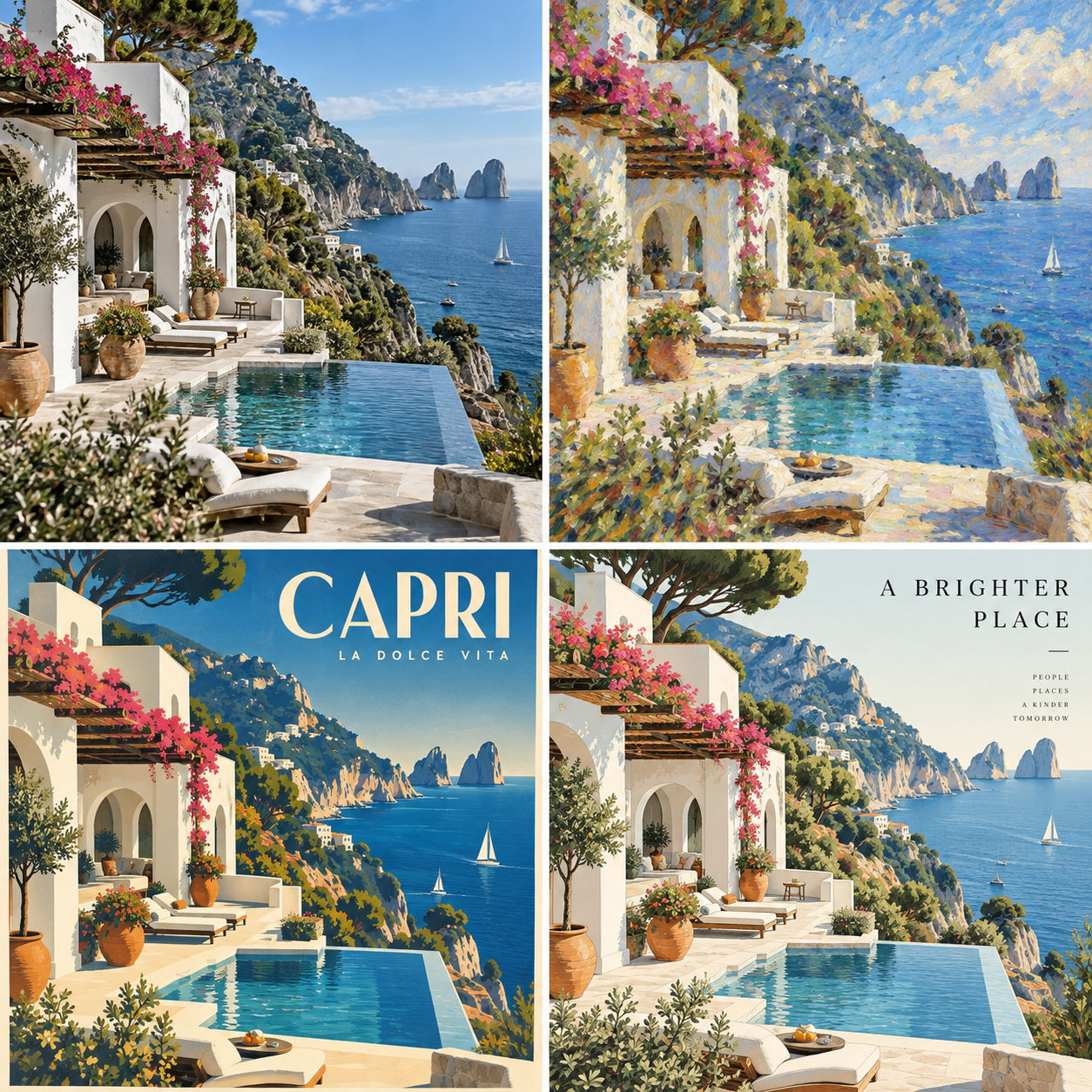
Create four interpretations of the same white Mediterranean seaside villa while preserving its architecture, camera angle, terrace layout, surrounding cliffs, and ocean position. Render one version as refined architectural photography, one as an impressionist painting, one as a vintage travel poster, and one as a premium editorial illustration. Each style should feel genuinely distinct while the underlying structure and recognizable scene remain consistent across all versions.
What is GPT Image 2.5?
GPT Image 2.5 is OpenAI's image generation and editing family. OpenAI describes it as improving visual detail, natural lighting, textures and the handling of complex visual instructions.
UniRoute offers the Flare and Sunburst text-to-image variants with a prompt and a combined resolution and aspect ratio option. Flare has the lower entry price, while Sunburst is described by OpenAI as a choice for more polished creative work.
GPT Image 2.5 follows GPT Image 2. OpenAI describes the newer family as improving visual quality and instruction following; this page makes its callable text-to-image variants available for comparison.
What you can do
What you can do with GPT Image 2.5 through UniRoute today.
Text to image
Describe the subject, style, composition and any wording you want in the image. Choose an available option and review the quote before running.

Other GPT Image 2.5 modes (image editing, reference-based creation and multi-turn refinement) are not available on UniRoute yet.
Specs & variants
The variants you can call, with their options and prices.
| Variant | Model ID | Modes | Inputs | Output | Price |
|---|---|---|---|---|---|
| GPT Image 2.5 Flare | gpt-image-2-5-flare-text-to-image | Text to image | Text prompt and a size option | Resolution: 1K, 2K, 4K; Aspect ratio: 1:1, 16:9 | $0.02 to $0.10 per request |
| GPT Image 2.5 Sunburst | gpt-image-2-5-sunburst-text-to-image | Text to image | Text prompt and a size option | Resolution: 1K, 2K, 4K; Aspect ratio: 1:1, 16:9 | $0.04 to $0.10 per request |
Pricing
Priced per request. The option you choose sets the price.
| GPT Image 2.5 Flare | |
|---|---|
| 1K · 1:1 | $0.02 |
| 1K · 16:9 | $0.02 |
| 2K · 1:1 | $0.06 |
| 2K · 16:9 | $0.06 |
| 4K · 1:1 | $0.10 |
| 4K · 16:9 | $0.10 |
| GPT Image 2.5 Sunburst | |
|---|---|
| 1K · 1:1 | $0.04 |
| 1K · 16:9 | $0.04 |
| 2K · 1:1 | $0.06 |
| 2K · 16:9 | $0.06 |
| 4K · 1:1 | $0.10 |
| 4K · 16:9 | $0.10 |
Rounded to the cent; the live quote in the workspace shows the exact amount. Prices updated 2026-11-24.
Pay as you go from a single USD wallet balance. You see the quote before each request.
API
Call GPT Image 2.5 from your own code with the media API.
cURL
# Requires bash, curl and jq. Set API_KEY to your own unified UniRoute Key.set -euo pipefail: "${API_KEY:?Set API_KEY first}"BASE='https://api.uniroute.app/v1/media'MODEL='gpt-image-2-5-sunburst-text-to-image'OPTION='1K:1:1'PROMPT='A calm sunrise over a mountain lake'curl -fsS --max-time 60 "$BASE/catalog" -H "Authorization: Bearer $API_KEY" | jq -e '.data.models'BODY=$(jq -n --arg model "$MODEL" --arg option "$OPTION" --arg prompt "$PROMPT" '{model:$model,option:$option,prompt:$prompt}')QUOTE_BODY=$(printf '%s' "$BODY" | jq '{model,option}')QUOTE=$(curl -fsS --max-time 60 "$BASE/quote" -H "Authorization: Bearer $API_KEY" -H 'Content-Type: application/json' -d "$QUOTE_BODY")CAP=$(printf '%s' "$QUOTE" | jq -er '.data.quoted_usd')BODY=$(printf '%s' "$BODY" | jq --arg cap "$CAP" '. + {max_cost_usd:$cap}')IDEMPOTENCY="example-$(date +%s)-$$"create() { curl -fsS --max-time 60 "$BASE/tasks" -H "Authorization: Bearer $API_KEY" -H "Idempotency-Key: $IDEMPOTENCY" -H 'Content-Type: application/json' -d "$BODY"; }TASK_ID=$(create | jq -er '.data.task_id')# The same request and idempotency key must return the original task without charging again.REPLAY_ID=$(create | jq -er '.data.task_id')[ "$TASK_ID" = "$REPLAY_ID" ]for attempt in $(seq 1 120); do TASK=$(curl -fsS --max-time 60 "$BASE/tasks/$TASK_ID" -H "Authorization: Bearer $API_KEY") printf '%s' "$TASK" | jq -e '.data | {task_id,status,billing}' if printf '%s' "$TASK" | jq -e '.data.status == "success" and .data.billing.state == "charged"' >/dev/null; then index=0 while IFS= read -r url; do index=$((index+1)) curl -fL --max-time 120 "$url" -o "$TASK_ID-$index.bin" done < <(printf '%s' "$TASK" | jq -er '.data.urls[].url') break fi if printf '%s' "$TASK" | jq -e '.data.status == "failed" and .data.billing.state == "released"' >/dev/null; then exit 1; fi if [ "$attempt" = 120 ]; then echo "Polling limit reached. Keep task ID $TASK_ID and query it later; do not create a new task." >&2 exit 1 fi sleep 5donecurl -fsS --max-time 60 "$BASE/tasks?limit=20" -H "Authorization: Bearer $API_KEY" | jq -e '.data'# Check this task and the caller Key in Console usage; billing.charged_usd is the actual USD charge.Parameters
| Name | In | Description |
|---|---|---|
model | Body | Model ID to run. |
option | Body | One of the options offered for the model: 1K:1:1, 1K:16:9, 2K:1:1, 2K:16:9, 4K:1:1, 4K:16:9. |
prompt | Body | Text prompt describing what to generate. |
max_cost_usd | Body | Maximum cost in USD for this task, taken from the quote. |
Idempotency-Key | Header | A unique key per task, so a repeated request returns the original task instead of charging again. |
Guides
Use cases
Typical ways to put GPT Image 2.5 to work.
Campaign imagery
Describe the subject, materials and lighting to draft a campaign visual, then compare the callable variants.
Product concepts
Explore product presentation, packaging ideas and branded compositions from a written creative brief.
Editorial portraits
Develop portrait concepts by specifying the setting, expression, camera framing and atmosphere in the prompt.
FAQ
Common questions about GPT Image 2.5.
What is GPT Image 2.5?
GPT Image 2.5 is OpenAI's image generation and editing family. OpenAI describes it as improving visual detail, natural lighting, textures and the handling of complex visual instructions.
Should I choose Flare or Sunburst?
OpenAI describes Flare as a lower-latency choice for everyday generation and Sunburst as a choice for polished visual work. Compare their catalog prices and try the same prompt to judge which fits your brief.
Which settings can I choose?
Choose Flare or Sunburst and a size option that combines resolution and aspect ratio. All available sizes and request prices are listed on this page.
How much does GPT Image 2.5 cost?
From $0.02 / image. Each request is quoted for the variant and option you select. The Pricing section lists every available request price (prices updated 2026-11-24).
Can I upload a reference image?
No. This UniRoute workspace currently takes a text prompt and the catalog option shown above. Reference-image inputs are not available for the variants listed here.
How do I call GPT Image 2.5 from code?
Use the media API: request a quote for your model and option, create a task with an Idempotency-Key and a maximum cost, then poll the task until the result is ready. The API section shows a complete example and the parameters.
Is there a free trial or free credits?
No. Generation is paid from your wallet balance. You can open the workspace and review the price without paying, create an account to see a live quote for your exact settings, and you are charged only for requests that are accepted.
Related models
Other versions, models from the same provider and alternatives.