
Seedance 2.0 Prompt Guide & Live Runner · bytedance/seedance-2Runtime Model: bytedance/seedance-2Default Preset: 480p · 5s (480p:5)

Seedance 2.0 Prompts: How to Prompt Seedance 2.0 for Short Video Clips

Use a practical 5-block Seedance 2.0 prompt structure covering shot continuity, sequential subject action, camera trajectory, lighting, and negative boundaries. Load either candidate prompt preset into the generator below, review the catalog price and your live USD quote before running, or copy the API workflow for bytedance/seedance-2.

Edit & Run Seedance 2.0 Prompts (Live Generator)

Review your options and price before generating.

Runtime Model: bytedance/seedance-2Seedance 2.0
Quick-load candidate presets:
Default: 480p:5
419/2000
Runtime model: bytedance/seedance-2·Selected spec: 480p:5

The selected option’s price is shown below; generated results can be played and downloaded.

Catalog price: $0.59375 USD · as of

Live Session Output
Ready

Play and download your result here after generating.

The selected option’s price is shown below; generated results can be played and downloaded.

Billing note: Funds are reserved up to your confirmed USD quote and charged only when settled; released holds return to your balance automatically.
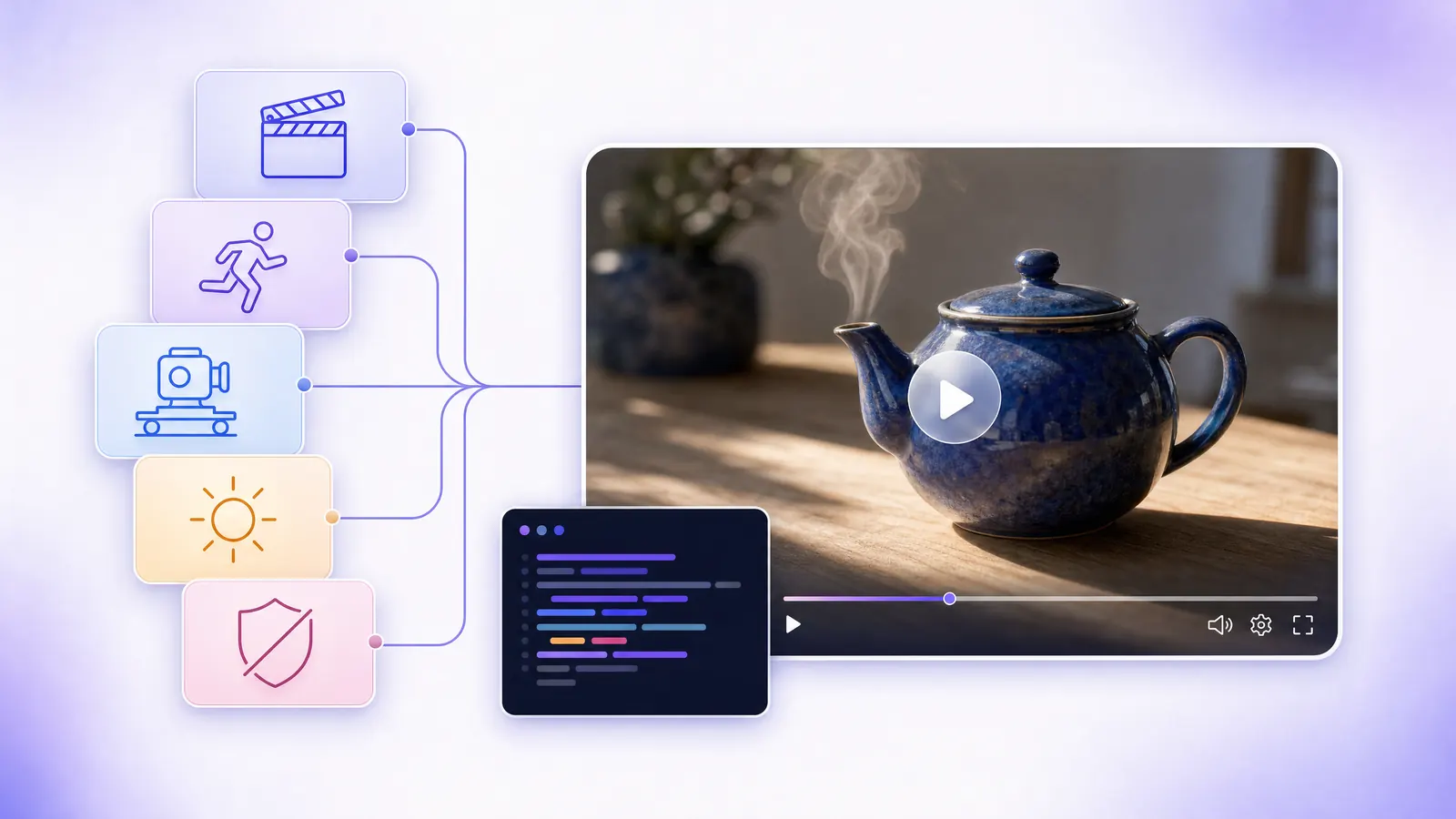
Seedance 2.0 prompt guide illustration: five prompt blocks (shot, subject action, camera, lighting, negative constraints) flowing into a teapot steam video

Official Seedance 2.0 Features vs. Current UniRoute Gateway Scope

Upstream ByteDance Seedance 2.0 materials describe multimodal reference tags (such as image, video, and audio references) and multi-shot creation on first-party studio surfaces. On the current UniRoute gateway integration for bytedance/seedance-2, requests accept text prompts only and do not support uploading reference images, videos, or audio files. The full model catalog lists six specification options (480p:5, 480p:10, 720p:5, 720p:10, 1080p:5, and 1080p:10); this page exposes the four 480p and 720p options in the preset selector with 480p:5 as the default starting preset.

Seedance 2.0 Prompt Presets & Observed 480p:5 Video Samples

The two prompt presets below pair a single-continuous-shot prompt structure with observed 5.04-second (864x496) MP4 samples generated on 2026-10-20 via bytedance/seedance-2 at quoted option 480p:5. Click Load into Generator to populate the editor above.

Observed sample note: Both 2026-10-20 sample clips were generated on bytedance/seedance-2 at quoted option 480p:5 (encoded at 864x496, 5.04 seconds) with generate_audio=false, so the embedded MP4 files contain no audio stream. This reflects the parameter used for these two sample runs and does not claim the Seedance 2.0 model cannot generate audio. New paid runs depend on live upstream provider availability and may vary across generations.

Preset #1 · Product & Tabletop Presetbytedance/seedance-2 · 480p:5

Cobalt Ceramic Teapot Steam Push-In

Observed 5.04-second (864x496) single-shot product sample on bytedance/seedance-2 at quoted option 480p:5 showing a cobalt-blue ceramic teapot with rising steam and a slow camera push-in (silent video clip from a generate_audio=false sample run).

Observed sample: 2026-10-20Observed 2026-10-20 on bytedance/seedance-2 at quoted option 480p:5 (encoded 864x496, 5.04s): cobalt-blue ceramic teapot with rising steam and a slow camera push-in. No audio stream is present in this file because this sample task was submitted with generate_audio=false (this describes the sample run setting and does not claim the model lacks audio support).
Camera Move:
Slow push-in from medium close-up while keeping object shape stable
Motion Pacing:
One continuous micro-action: thin curl of steam rising from the spout
Lighting Style:
Soft cool window light, shallow depth of field, realistic ceramic glaze
Stability Guardrail:
No people, no lettering, no cut, no sudden camera movement
Full English Prompt Text
Single continuous five-second product shot. A small cobalt-blue ceramic teapot sits on an oak table beside a rain-streaked window. A thin curl of steam rises from the spout. The camera slowly pushes in from a medium close-up to the teapot, keeping its shape stable. Soft cool window light, shallow depth of field, realistic ceramic glaze, calm cinematic mood. No people, no lettering, no cut, no sudden camera movement.
Recorded sample clip & prompt preset (load into generator above)
Preset #2 · Wildlife & Natural Motion Presetbytedance/seedance-2 · 480p:5

Red Fox Dawn Forest Tracking Shot

Observed 5.04-second (864x496) single-shot wildlife sample on bytedance/seedance-2 at quoted option 480p:5 showing a red fox walking through a dawn forest with sideways tracking and a slight turn while maintaining stable anatomy in inspected frames (silent video clip from a generate_audio=false sample run).

Observed sample: 2026-10-20Observed 2026-10-20 on bytedance/seedance-2 at quoted option 480p:5 (encoded 864x496, 5.04s): red fox walking through a dawn forest with sideways eye-level tracking, a brief pause, and a slight ear turn while maintaining stable anatomy in inspected frames. No audio stream is present in this file because this sample task was submitted with generate_audio=false (this describes the sample run setting and does not claim the model lacks audio support).
Camera Move:
Sideways eye-level tracking at a steady distance with full-body silhouette
Motion Pacing:
Two-beat sequence: walk left to right, pause once, turn ears toward sound
Lighting Style:
Soft golden rim light through morning mist with natural fur detail
Stability Guardrail:
No people, no text, no montage, no abrupt zoom
Full English Prompt Text
Single continuous five-second nature shot at dawn. A small red fox walks from left to right along a mossy forest path, pauses once, and turns its ears toward a distant sound. The camera tracks sideways at the fox eye level, maintaining a steady distance and a clear full-body silhouette. Soft golden rim light through morning mist, natural fur detail, believable anatomy and measured movement. No people, no text, no montage, no abrupt zoom.
Recorded sample clip & prompt preset (load into generator above)

How to Adapt the Two Candidate Prompts for Your Own Scenes

Instead of writing an unstructured paragraph from scratch, keep the 5-sentence skeleton from the two presets above and swap one slot at a time:

Prompt SlotCandidate Preset ExampleHow to AdaptStability Guardrail
1. Shot Header & DurationSingle continuous five-second product shot.Replace the genre noun (product shot, nature shot, tabletop macro shot, interior shot) and match five-second or ten-second to your selected spec duration.Keep the phrase Single continuous so the prompt stays framed as one uninterrupted take.
2. Primary Subject & SettingA small cobalt-blue ceramic teapot sits on an oak table beside a rain-streaked window.Swap in one clear object or creature with 1–2 concrete surface adjectives and a simple background setting.Avoid crowding multiple independent characters or readable text labels into the same frame.
3. Sequential Action BeatsA small red fox walks from left to right along a mossy forest path, pauses once, and turns its ears toward a distant sound.Use either one continuous micro-motion (steam rising, water rippling) or a simple two-beat sequence (move, then pause or turn).Limit a 5-second prompt to at most two sequential action beats.
4. Camera Move & Frame AnchorThe camera slowly pushes in from a medium close-up to the teapot, keeping its shape stable.Choose one camera instruction—locked frame, slow push-in, or sideways eye-level tracking—and state what remains centered or stable.Do not combine push-in, whip-pan, and zoom in the same sentence.
5. Lighting + Negative BoundariesSoft cool window light, shallow depth of field, realistic ceramic glaze, calm cinematic mood. No people, no lettering, no cut, no sudden camera movement.Pair light direction and surface material cues with a closing No ... clause that excludes unwanted text, cuts, or sudden camera jumps.Skip generic buzzwords like 8K or masterpiece in favor of concrete lighting and texture terms.

How to Prompt Seedance 2.0: The 5-Block Short-Shot Structure

When writing a text-to-video prompt for a 5-second or 10-second clip on bytedance/seedance-2, organizing your prompt into five ordered blocks helps keep the scene focused on one continuous take:

Block 01

Declare Shot Continuity & Duration First

Open the prompt by framing the clip as a single continuous five-second or ten-second shot rather than a multi-scene storyboard.

Recommended: Single continuous five-second product shot.
Avoid: A commercial with three quick cuts of a teapot.
Block 02

Anchor One Subject + 1–2 Sequential Beats

Describe a clear primary subject and at most one or two sequential actions (for example: walk left to right, pause once, turn ears) so the action fits comfortably inside a short clip.

Recommended: A small red fox walks from left to right along a mossy forest path, pauses once, and turns its ears toward a distant sound.
Avoid: A fox runs, jumps over a river, chases a bird, and barks at the camera.
Block 03

Specify One Unambiguous Camera Trajectory

Pick a single camera behavior—locked tripod frame, slow push-in, or sideways eye-level tracking—and state what stays anchored in the frame.

Recommended: The camera slowly pushes in from a medium close-up to the teapot, keeping its shape stable.
Avoid: Dynamic drone zoom in and out while whip-panning 360 degrees.
Block 04

Describe Light Direction & Surface Texture

Use concrete light sources and material cues such as ceramic glaze, morning mist rim light, oak grain, or rain-streaked glass instead of vague quality tags.

Recommended: Soft cool window light, shallow depth of field, realistic ceramic glaze, calm cinematic mood.
Avoid: 4K, 8K, masterpiece, trending, hyper-detailed.
Block 05

Close with Explicit Negative Boundaries

End with a concise negative clause that excludes unwanted elements such as extra people, on-screen lettering, montage cuts, or abrupt camera jumps.

Recommended: No people, no lettering, no cut, no sudden camera movement.
Avoid: Leaving text or cut exclusions unspecified.

Catalog Specification Options for bytedance/seedance-2

The UniRoute catalog for bytedance/seedance-2 lists six specification options across 480p, 720p, and 1080p (480p:5, 480p:10, 720p:5, 720p:10, 1080p:5, and 1080p:10). The interactive selector on this page exposes the four 480p and 720p options below, with 480p:5 selected by default. The selected option shows its catalog price before sign-in; your account shows a live USD quote and wallet balance before submitting a task.

optionRes / DurationBest For
480p:5480p · 5 secondsDefault starting preset for drafting a 5-second single-shot prompt and checking composition.
480p:10480p · 10 secondsDrafting 10-second continuous prompts at 480p resolution.
720p:5720p · 5 seconds720p 5-second single-shot tabletop or nature prompts.
720p:10720p · 10 seconds720p 10-second continuous single-shot prompts (1080p:5 and 1080p:10 are also available on the full model page).

Full gateway catalog options (bytedance/seedance-2): 480p:5, 480p:10, 720p:5, 720p:10, 1080p:5, 1080p:10

Seedance 2.0 (/models/seedance-2-0) vs. Seedance 2.5 (/models/seedance-2-5)

UniRoute lists Seedance 2.0 and Seedance 2.5 as separate model pages with distinct runtime IDs. This prompt guide is bound to Seedance 2.0 (runtime ID bytedance/seedance-2, canonical model page /models/seedance-2-0). The sibling model page at /models/seedance-2-5 corresponds to Seedance 2.5 (runtime ID bytedance/seedance-2-5). Keep the model IDs and catalog specification options separate when quoting or submitting tasks.

Seedance 2.0 (bytedance/seedance-2)

Full catalog supports 480p:5, 480p:10, 720p:5, 720p:10, 1080p:5, 1080p:10; this page's quick selector defaults to 480p:5.

Seedance 2.5 (bytedance/seedance-2-5)

Adjacent ByteDance Seedance family page with its own runtime ID, catalog options, and live USD quote.

How to Edit & Run Seedance 2.0 Prompts on UniRoute

1. Load One of the Two Candidate Presets or Edit Your Own

Select either the tabletop teapot preset or the dawn red fox preset, then customize the subject, camera trajectory, or lighting using the 5-slot editing guide.

2. Select a Catalog Spec Option (Default 480p:5)

Keep the default 480p:5 spec or switch to 480p:10, 720p:5, or 720p:10. Before sign-in, the page shows the selected option catalog price; your account shows a live USD quote and wallet balance before running.

3. Submit in Browser or Copy the API curl Workflow

Run the task in the browser generator with idempotent session recovery and automatic reservation release on upstream failure, or copy the curl snippet for your backend.

Frequently Asked Questions: Seedance 2.0 Prompts

How should I structure a Seedance 2.0 prompt for a 5-second clip?

Organize the prompt into five parts: 1) declare a single continuous five-second shot, 2) describe one primary subject with at most one or two sequential action beats, 3) specify one camera move (such as a slow push-in or sideways eye-level tracking), 4) add concrete lighting and material details, and 5) finish with negative boundaries like no people, no lettering, no cut, no sudden camera movement.

Does bytedance/seedance-2 on UniRoute accept reference image, video, or audio uploads?

No. While upstream ByteDance Seedance 2.0 documentation describes multimodal reference tags on official first-party surfaces, the current UniRoute gateway integration for bytedance/seedance-2 accepts text prompts only and does not support uploading reference images, videos, or audio files.

What specification options are listed for bytedance/seedance-2?

The UniRoute model catalog for bytedance/seedance-2 lists six specification options: 480p:5, 480p:10, 720p:5, 720p:10, 1080p:5, and 1080p:10. This prompt guide exposes the four 480p and 720p options in its quick selector with 480p:5 as the default preset, with the selected option catalog price available before sign-in and a live USD quote and wallet balance shown for your account before running.

How does /models/seedance-2-0 differ from /models/seedance-2-5?

/models/seedance-2-0 is the model page for Seedance 2.0 (runtime ID bytedance/seedance-2). /models/seedance-2-5 is the model page for Seedance 2.5 (runtime ID bytedance/seedance-2-5). Always match your request payload to the exact runtime model ID and catalog options for the endpoint you intend to call.

Explore Seedance Model Pages, API Docs & Video Templates

Run Seedance 2.0 Prompts with Live USD Quoting

Review the selected option catalog price before sign-in, then confirm your live USD quote and wallet balance to run bytedance/seedance-2 prompts in the browser or via the unified media task API.