Loading model…正在加载模型详情…

 Qwen
Generate images from text with Tongyi-MAI's Z-Image, exploring photorealistic scenes and English and Chinese text in the browser or by API.
- From $0.005 / image
- 1:1, 16:9 or 9:16

Examples
Generate a photorealistic image of a cafe terrace in the Marais district of Paris on a Wednesday morning in March 2025. It is a crisp, cool spring morning with clear skies. Locals are drinking coffee. In sharp focus should be a young woman with a pixie cut wearing a scarf, stirring a cappuccino and looking thoughtfully to the side; the waiter and street traffic behind her are blurred. The photo should have the candid, natural morning light feel of an iPhone image.
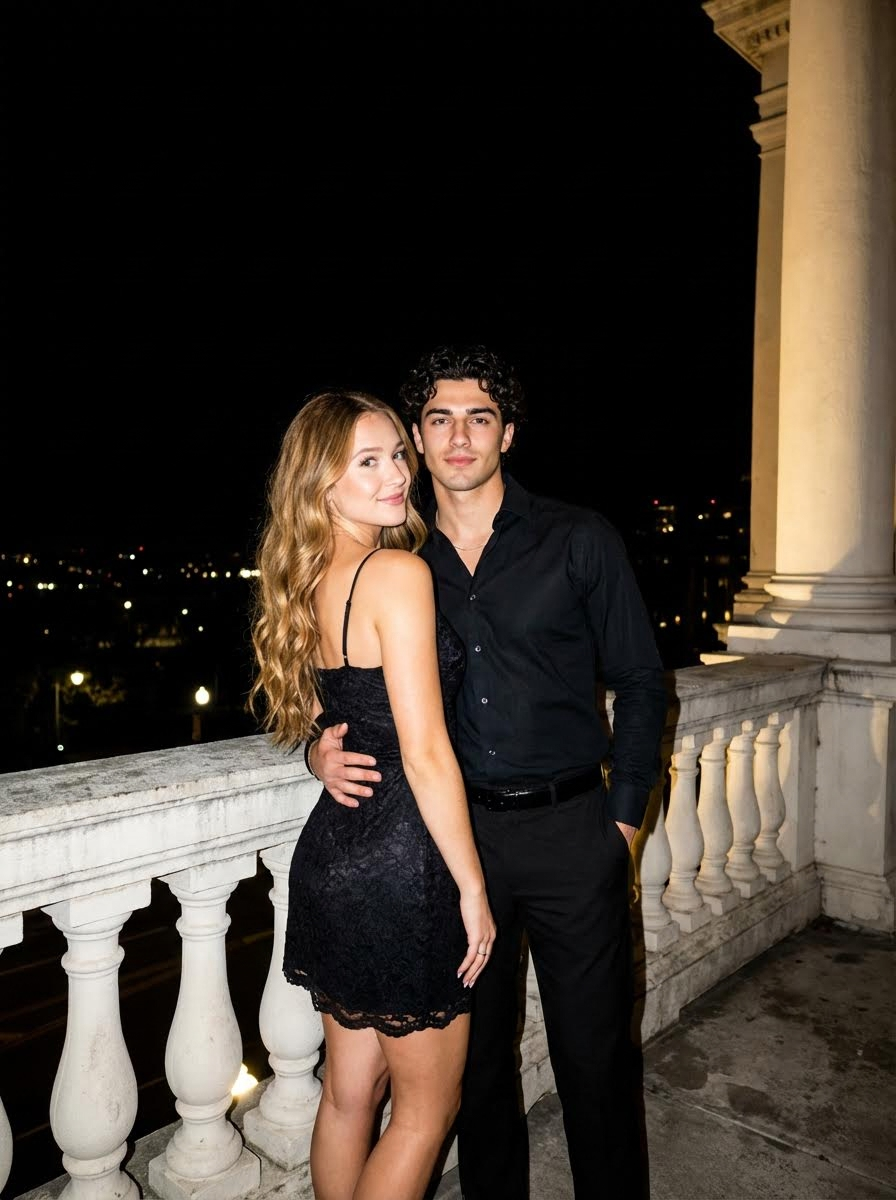
A realistic, high-resolution night photograph mimicking the aesthetic of flash photography, featuring a stylish young couple posing closely together on an elegant stone balcony with a classic white balustrade. The young woman, positioned on the left with her body angled slightly away, has long, voluminous honey-blonde wavy hair cascading down her back and is wearing a black spaghetti-strap mini dress featuring intricate lace detailing on the bodice and a tiered, ruffled skirt; she looks back over her shoulder at the camera with a soft, pleasant smile while resting one hand on the man's shoulder. Beside her stands a handsome young man with tan skin, dark curly hair styled with a fade, and a confident expression, dressed in a crisp black button-down shirt tucked into black dress pants with a visible leather belt, his arm wrapped affectionately around her waist. The setting is nighttime with a pitch-black sky and distant, out-of-focus city lights visible in the background, contrasting with the bright, direct lighting on the subjects and the white architectural column on the right, capturing a candid, trendy "date night" or homecoming social media vibe.
What is Z-Image?
Z-Image is Tongyi-MAI's image generation model. Tongyi-MAI describes its strengths in photorealistic output, bilingual text rendering and understanding detailed scene descriptions.
On UniRoute, the z-image variant takes a text prompt and an aspect ratio option. The catalog exposes the formats shown in the workspace; each request is quoted before generation.
This page covers the callable z-image variant. Tongyi-MAI’s description highlights product imagery, bilingual graphics and knowledge-based scenes; the specs below show the controls available through UniRoute.
What you can do
What you can do with Z-Image through UniRoute today.
Text to image
Describe the subject, lighting, composition and any English or Chinese wording. Select an aspect ratio and create a new image from the prompt.
Other Z-Image modes (reference-image editing) are not available on UniRoute yet.
Specs & variants
The variants you can call, with their options and prices.
| Variant | Model ID | Modes | Inputs | Output | Price |
|---|---|---|---|---|---|
| Z-Image | z-image | Text to image | Text prompt and an option for aspect ratio | Aspect ratio: 1:1, 16:9, 9:16 | $0.005 per request |
Pricing
Priced per request. The option you choose sets the price.
| Z-Image | |
|---|---|
| 1:1 | $0.005 |
| 16:9 | $0.005 |
| 9:16 | $0.005 |
Rounded to the cent; the live quote in the workspace shows the exact amount. Prices updated 2026-11-25.
Pay as you go from a single USD wallet balance. You see the quote before each request.
API
Call Z-Image from your own code with the media API.
cURL
# Requires bash, curl and jq. Set API_KEY to your own unified UniRoute Key.set -euo pipefail: "${API_KEY:?Set API_KEY first}"BASE='https://api.uniroute.app/v1/media'MODEL='z-image'OPTION='1:1'PROMPT='A calm sunrise over a mountain lake'curl -fsS --max-time 60 "$BASE/catalog" -H "Authorization: Bearer $API_KEY" | jq -e '.data.models'BODY=$(jq -n --arg model "$MODEL" --arg option "$OPTION" --arg prompt "$PROMPT" '{model:$model,option:$option,prompt:$prompt}')QUOTE_BODY=$(printf '%s' "$BODY" | jq '{model,option}')QUOTE=$(curl -fsS --max-time 60 "$BASE/quote" -H "Authorization: Bearer $API_KEY" -H 'Content-Type: application/json' -d "$QUOTE_BODY")CAP=$(printf '%s' "$QUOTE" | jq -er '.data.quoted_usd')BODY=$(printf '%s' "$BODY" | jq --arg cap "$CAP" '. + {max_cost_usd:$cap}')IDEMPOTENCY="example-$(date +%s)-$$"create() { curl -fsS --max-time 60 "$BASE/tasks" -H "Authorization: Bearer $API_KEY" -H "Idempotency-Key: $IDEMPOTENCY" -H 'Content-Type: application/json' -d "$BODY"; }TASK_ID=$(create | jq -er '.data.task_id')# The same request and idempotency key must return the original task without charging again.REPLAY_ID=$(create | jq -er '.data.task_id')[ "$TASK_ID" = "$REPLAY_ID" ]for attempt in $(seq 1 120); do TASK=$(curl -fsS --max-time 60 "$BASE/tasks/$TASK_ID" -H "Authorization: Bearer $API_KEY") printf '%s' "$TASK" | jq -e '.data | {task_id,status,billing}' if printf '%s' "$TASK" | jq -e '.data.status == "success" and .data.billing.state == "charged"' >/dev/null; then index=0 while IFS= read -r url; do index=$((index+1)) curl -fL --max-time 120 "$url" -o "$TASK_ID-$index.bin" done < <(printf '%s' "$TASK" | jq -er '.data.urls[].url') break fi if printf '%s' "$TASK" | jq -e '.data.status == "failed" and .data.billing.state == "released"' >/dev/null; then exit 1; fi if [ "$attempt" = 120 ]; then echo "Polling limit reached. Keep task ID $TASK_ID and query it later; do not create a new task." >&2 exit 1 fi sleep 5donecurl -fsS --max-time 60 "$BASE/tasks?limit=20" -H "Authorization: Bearer $API_KEY" | jq -e '.data'# Check this task and the caller Key in Console usage; billing.charged_usd is the actual USD charge.Parameters
| Name | In | Description |
|---|---|---|
model | Body | Model ID to run. |
option | Body | One of the options offered for the model: 1:1, 16:9, 9:16. |
prompt | Body | Text prompt describing what to generate. |
max_cost_usd | Body | Maximum cost in USD for this task, taken from the quote. |
Idempotency-Key | Header | A unique key per task, so a repeated request returns the original task instead of charging again. |
Guides
Use cases
Typical ways to put Z-Image to work.
Product and lifestyle concepts
Describe an object, its materials and a setting to explore product imagery and lifestyle scenes.
Bilingual posters
Specify English and Chinese wording, spacing and layout for a poster or promotional graphic.
Educational and cultural visuals
Describe a landmark, cultural scene or explanatory concept to draft an illustration for review.
FAQ
Common questions about Z-Image.
What is Z-Image?
Z-Image is Tongyi-MAI's image generation model. Tongyi-MAI describes its strengths in photorealistic output, bilingual text rendering and understanding detailed scene descriptions.
Which settings can I choose?
Choose an aspect ratio from the workspace. This catalog entry does not expose a separate resolution setting or reference-image input.
How much does Z-Image cost?
From $0.005 / image. Each request is quoted for your selected variant and option. The full table is in the Pricing section (prices updated 2026-11-25).
Which generation mode is available?
The variants listed here generate new images from text prompts. The workspace shows the options exposed by the current catalog.
How do I call Z-Image from code?
Use the media API: request a quote for your model and option, create a task with an Idempotency-Key and a maximum cost, then poll the task until the result is ready. The API section shows a complete example and the parameters.
Is there a free trial or free credits?
No. Generation is paid from your wallet balance. You can open the workspace and review the price without paying, create an account to see a live quote for your exact settings, and you are charged only for requests that are accepted.
Related models
Other versions, models from the same provider and alternatives.