
Ponytail for Claude Code: Install, Keep Changes Small & Check Task Cost
Install the Ponytail plugin in Claude Code, confirm the ruleset is active, run a bounded task without extra abstractions, and reconcile your actual API task cost.
UniRoute
On this page
When you ask Claude Code for a small feature or bug fix, the agent can easily turn a focused request into an overbuilt subsystem—adding unrequested helper layers, extra files, or new dependencies that you then have to review and maintain.
Ponytail (dietrichgebert/ponytail, verified against v5.3.3 on 2026-11-09) is an open-source Claude Code plugin that instructs the agent to complete the task with the smallest change that fully solves it, reusing existing project code and platform features first. As the official README.md puts it, "Lower cost and latency are a side effect."
This guide walks through installing Ponytail, confirming its ruleset is active, running and evaluating a bounded birthday-field task, and—when using pay-as-you-go API billing—summing your settled per-task API spend from CSV records. Installing Ponytail itself does not require an API gateway key or external setup tool.
1. Install Ponytail and Confirm It Is Active
Keep Claude Code slash commands (entered inside the Claude Code prompt box in the Terminal CLI or the Claude Desktop app's Code tab) separate from system terminal commands (entered in bash or zsh).
Add the Plugin Marketplace Inside Claude Code
In the Claude Code prompt input box, send this first slash command and wait for it to finish:
/plugin marketplace add DietrichGebert/ponytail
Claude Code clones DietrichGebert/ponytail and prints ✔ Successfully added marketplace: ponytail (declared in user settings), verified in our 2026-11-09 isolated CLI install of v5.3.3 on Claude Code 2.1.319.
Install the Plugin Inside Claude Code
Once the marketplace is added, send this second slash command in the Claude Code prompt input box:
/plugin install ponytail@ponytail
Wait for the confirmation message Successfully installed plugin: ponytail@ponytail (scope: user).
Start a New Session and Run /ponytail
Open a new Claude Code session so Ponytail's SessionStart lifecycle hook (hooks/claude-codex-hooks.json) injects the ruleset into the session context; its UserPromptSubmit hook (ponytail-mode-tracker.js) tracks /ponytail mode changes across turns. Then send:
/ponytail
Under default settings, the hook reports PONYTAIL MODE ACTIVE — level: full (our 2026-11-09 CLI install and offline hook replay of v5.3.3 verify isolated plugin installation and hook execution with zero model calls, not an interactive model benchmark).
Watch out for bare
/ponytailwhenoff(v5.3.3): Running/ponytailwith no arguments is not a read-only status check when Ponytail isoff. If you previously ran/ponytail off(PONYTAIL MODE OFF), bare/ponytailturns Ponytail back on to your configured default level (lite,full, orultra, falling back tofullwhen your configured default isoff) and printsPONYTAIL MODE CHANGED — level: <level>(level: fullby default).
Troubleshooting: Hook Prints node: command not found
Ponytail's two lifecycle hooks (SessionStart and UserPromptSubmit) execute with Node.js. Per the official INSTALL.md, if node is missing from the non-interactive PATH inherited by the Claude Code process, direct skill commands still work, but hook execution prints node: command not found.
In your system terminal, verify that sh resolves node, then launch claude from that same terminal. If the sh -c check fails, install Node.js or expose your node binary directory in your shell startup PATH before relaunching claude. Note that sh -c only checks the parent terminal where you run it, not a client launched separately from the Dock or Spotlight:
sh -c 'command -v node && node --version'
claude
2. Choose a Mode and Run a Bounded Task
Which Mode Fits Your Current Task?
You can switch modes at any time inside the Claude Code prompt box:
| Command | When to Use It | Official v5.3.3 Behavior |
|---|---|---|
/ponytail full | Daily feature work & bug fixes (default) | Applies the full six-step smallest-change ruleset. |
/ponytail lite | When you want options before cutting scope | Builds what was asked; names the smaller option in one line and lets you pick. |
/ponytail ultra | Early scoping or prototypes | Questions the request first and pushes back on parts the need does not justify. |
/ponytail off | Open-ended scaffolding or baseline runs | Turns Ponytail off for the rest of the current session. |
Walkthrough Scenario: Adding a Required Birthday Date Field
To see how Ponytail's ruleset shapes an implementation, we use a bounded form change mapped to skills/ponytail/SKILL.md (v5.3.3). You can copy this prompt into Claude Code on a form in your own repository:
In our profile/settings form, add a required birthday date field using our existing form component and validation pattern, update any affected form types and tests, and verify the build passes.
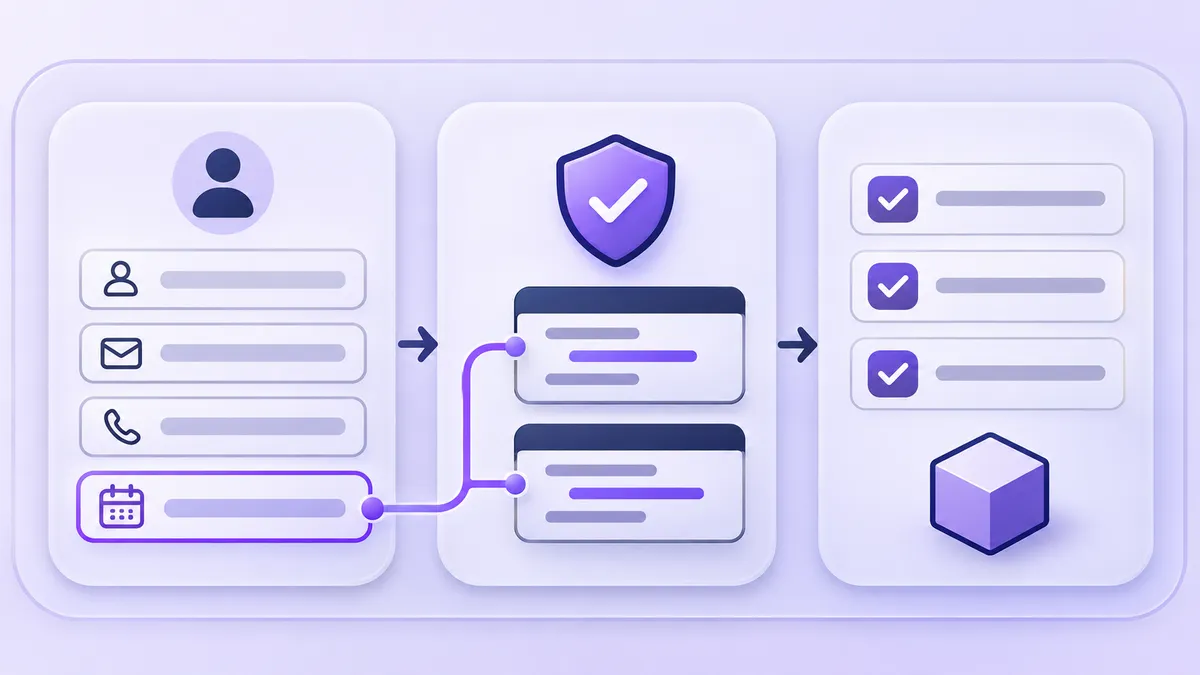
Figure 1 — Conceptual scope diagram: from left to right, adding the required birthday field to the existing form, updating affected types and validation under the safety boundary, and verifying unit tests and the build. Keeping a change small only works when the delivery remains end-to-end complete.
Instead of inventing a custom calendar subsystem, Ponytail evaluates the task through six priority questions in order:
Priority Step in SKILL.md (v5.3.3) | What It Keeps or Reuses on This Task | Unrequested Scope It Skips |
|---|---|---|
| 1. Does it need to exist? | Adds only the required birthday field and names skipped extras in one line. | Age-tier badges, zodiac helpers, or recurring birthday reminder toggles. |
| 2. Already in this codebase? | Inspects neighboring profile fields and reuses the project's existing form Input component and schema. | Creating a duplicate form-field wrapper component. |
| 3. Standard library or platform? | Uses native <input type="date"> if the repo has no house date component. | Writing a custom calendar grid or date parser from scratch. |
| 4. Installed dependency? | Uses validation packages already in package.json. | Installing a new third-party date-picker library for a single field. |
| 5–6. Readable one-liner / minimum code | Wires the field, types, and unit test in clear, minimal code. | Premature helper abstractions or cryptic one-liners. |
Across all levels, SKILL.md requires updating affected callers and tests, and forbids cutting validation at trust boundaries, error handling that prevents data loss, security and <label> accessibility, or anything you explicitly requested.
What the Completed Change Looks Like in a Runnable Teaching Form
To make those acceptance criteria concrete, we built and ran a small local TypeScript teaching form that adds the required native Birthday date input onto an existing two-field profile form (Display name and Contact email). This is an instructional fixture for checking acceptance behavior, not output from a paid Ponytail model run. Below are the two states to verify—rejecting an empty submission first, then saving a valid date:
- Submit with an empty birthday first: Leaving
Birthdayempty and clicking Save profile triggers the boundary check before any state is written:
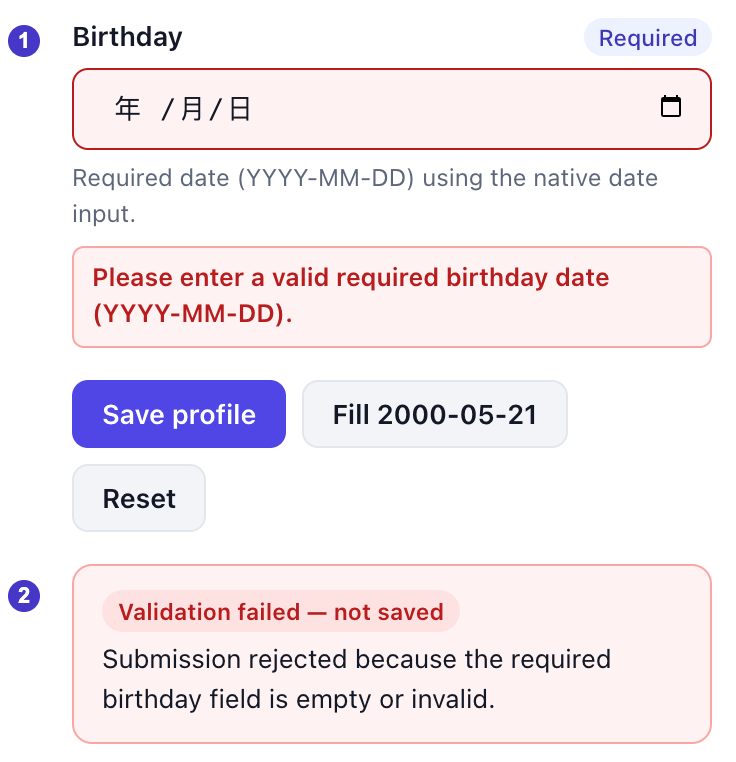
Figure 2 — Local teaching form run (empty birthday rejected): (1) the required native date input highlights in red with a clear field error when submitted empty; (2) the status panel reports Validation failed — not saved and writes no record. A minimal change still has to block invalid input before touching state.
- Enter a valid date (
2000-05-21) and save: Filling the native date control with2000-05-21and clicking Save profile clears the error and updates the in-memory record:
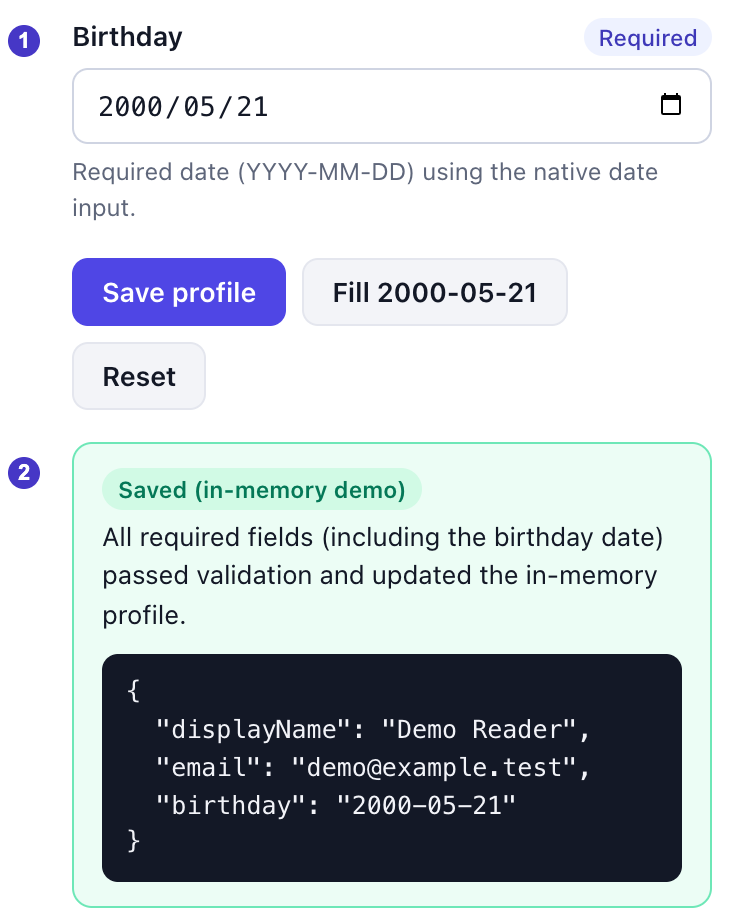
Figure 3 — Local teaching form run (valid birthday saved): (1) the native date input holds 2000-05-21 with the error state cleared; (2) the result panel switches to Saved (in-memory demo) and outputs the complete JSON record with displayName, email, and birthday. Reusing the existing form flow completes the save loop without regressing neighboring fields.
3. Check Whether Ponytail Is Worth Keeping
Three Concrete Judgments from the Birthday Field Walkthrough
Fewer lines of code, lower context usage, fewer output tokens, a lower API bill, and easier long-term maintenance are five distinct outcomes. Reviewing the runnable teaching form above highlights three practical criteria to judge whether a small-change ruleset is helping your codebase:
- The full
input → validation → saved recordpath matters more than raw line count: A minimal diff is only worth keeping if empty submissions are blocked (Figure 2), impossible calendar dates like2000-02-31or1900-02-29are rejected while valid dates (2000-05-21,2001-06-22, and leap day2000-02-29) save cleanly (Figure 3), the<label>stays associated with the date input while the field error is announced to assistive technologies, and bothprofile.test.tsunit tests and TypeScriptstrictchecks pass. - Reusing existing descriptors and native
<input type="date">is enough for a bounded field: Adding one entry toPROFILE_FIELDSand one calendar check invalidateProfiledelivered the feature with zero CSS diff (style.cssstayed byte-identical) and zero newpackage.jsondependencies—no custom calendar popover or wrapper component required. - A smaller maintenance surface pays off immediately in review and upkeep: Skipping unrequested age-tier badges, zodiac helpers, or reminder toggles leaves fewer files and edge cases for the team to review and maintain; to see how your own tasks affect API spend, check your usage records in Sections 4 and 5.
My takeaway: In small form and CRUD changes like this, I care most about empty-input and calendar-boundary validation, a verifiable saved payload, and a tight diff boundary—when the existing field pattern and native date control cover the requirement end to end, skipping an extra date-picker package or helper layer is a concrete maintenance win.
What Published Benchmarks Show (and Why Individual Tasks Vary)
Published evaluations show that Ponytail reduces output tokens and task cost on average, while individual tasks still vary. Treat these figures as reference findings for their tested versions and datasets rather than a guaranteed savings rate on every task:
| Study / Source | Version & Sample | Reported Outcome | Key Takeaway for Your Workflow |
|---|---|---|---|
| JetBrains Paired Evaluation | v4.8.4 · 80 paired tasks | -10.3% typical task cost (46 cheaper, 34 more expensive); -15.4% tool-emitted code; no quality drop detected. | Installing only SKILL.md (npx skills add) self-activated 0/10 times; the Claude Code plugin's SessionStart hook injects the ruleset automatically into new sessions and subagents (PONYTAIL_SUBAGENT_MATCHER). |
| Official Ponytail v5 Benchmark | v5 · 39 tasks × 5 runs | -26% cost (cheaper on 30 of 38 comparable tasks); -45% output tokens vs. no skill. | Tested across 39 task types (5 runs each) with Bash disabled in all conditions and the harness running tests after the agent finished—treat the average as a controlled benchmark rather than a fixed gain on interactive debugging tasks. |
| Dave Brown Review & Issue #126 | Single paired build & benchmark discussion | Observed lower context usage on one sample but saw no clear maintainability improvement and did not measure USD API billing; questioned how much benchmark gaps depend on verbose baselines vs. short prompts. | Always check both code maintainability and your own settled API billing records. |
4. Compare off vs. full with Your Own Usage Records
Installing Ponytail does not require UniRoute. Inside Claude Code, /cost shows a local session estimate, /ponytail-gain displays Ponytail's official benchmark scoreboard rather than your account bill, and an official Claude subscription (/login) bills against plan limits.
If you run Claude Code on pay-as-you-go API billing through the UniRoute API (https://api.uniroute.app), every /v1/messages call is logged in the UniRoute Console under Detailed records. Because a single coding task makes multiple API requests—file reads, tool calls, subagents, and test runs—and the Console logs one row per request, use two dedicated API keys to record a clean Run A (off) vs. Run B (full) comparison:
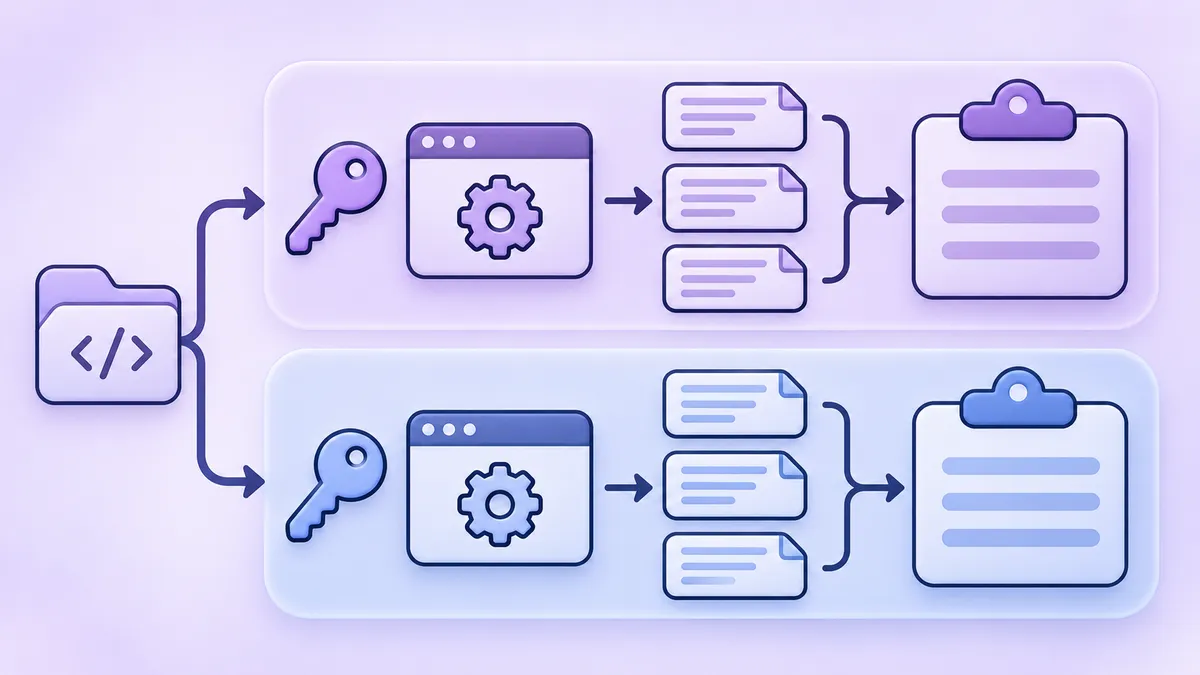
Figure 4 — Conceptual paired-run design: starting from the same git commit, prompt, model, and settings, the top track runs with off (Key A) and the bottom track runs with full (Key B). Giving each run its own API key lets you group multiple per-request log rows into a single settled task total.
1. Create Two Dedicated API Keys
In the Console (Create API Key Guide), create two valid keys with distinct names before configuring the client—for example, ponytail-off-demo for Run A and ponytail-full-demo for Run B—so every request from each run carries its own Key name (api_key in CSV exports).
2. Configure Claude Code with Key A and a Pinned Model
With Node.js 22+ installed, run the UniRoute configuration CLI (configure claude, passing --model claude-sonnet-5-5 so both runs use the exact same model; see the UniRoute Configuration Tool & Skill Guide or Claude Code CLI Setup Guide, separate from DietrichGebert/ponytail):
npx -y uniroute-setup@latest configure claude --model claude-sonnet-5-5
When no key environment variable or key file is set, the CLI prompts for your API key using hidden terminal input and backs up existing config files before writing. Never pass raw keys on the command line; enter Key A (ponytail-off-demo) at the prompt for your first run.
3. Complete Run A (off Before SessionStart) Using Key A
Ponytail's SessionStart hook injects the default full ruleset as soon as a session opens, so typing /ponytail off mid-session does not remove instructions already in context. Prepare two git worktrees at the same HEAD commit and keep the same model (claude-sonnet-5-5), channel setting, effort level, and acceptance tests.
In Worktree A, launch a clean Claude Code session with off set before startup:
PONYTAIL_DEFAULT_MODE=off claude
Run the birthday date field prompt and verification tests. Do not run bare /ponytail during Run A—when off, bare /ponytail re-enables your configured default level (or full if your configured default is off).
4. Switch to Key B and Complete Run B (full Before SessionStart)
Re-run npx -y uniroute-setup@latest configure claude --model claude-sonnet-5-5 and enter Key B (ponytail-full-demo) at the hidden prompt, or update your key per the Claude Code CLI Setup Guide. Then open a new clean session in Worktree B at the same starting commit and run the exact same prompt and verification tests:
PONYTAIL_DEFAULT_MODE=full claude
In the UniRoute Console under Detailed records, each /v1/messages request from Run A and Run B appears with its Key name and settled Actual cost:
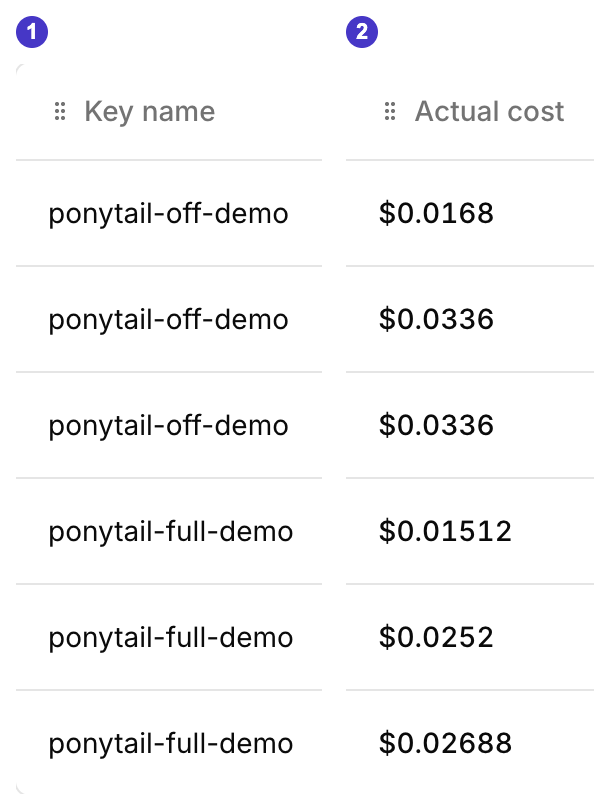
Figure 5 — Local Console Detailed records (side-by-side column crops from a synthetic tutorial fixture, with horizontal blank space omitted): (1) Key name separates the requests from each run, and (2) Actual cost shows each row's settled USD charge. Because one task spans multiple rows, group by (1) and sum (2) for the full task cost. Open full-size image.
5. Export CSV and Sum Your Task Total (Worked Example)
The Console's API Keys page displays each key's name and prefix rather than its numeric ID, while the web table's key filter field only accepts a numeric API key ID. Exporting CSV gives you the readable api_key column (Key name, alongside api_key_id for the numeric ID) and actual_cost_usd (settled USD charge), making it straightforward to sum each run in any spreadsheet.
Set Filters, Click Apply, and Export CSV
In the UniRoute Console Detailed records top filter bar:
- Date range: Select the date window covering your two runs. CSV exports fetch 100 rows per batch up to 5,000 rows; for high-volume workloads, narrow the date window and export in batches.
- Model name: Leave the Model name input empty so any subagent or helper-model calls triggered during the task are included in the task total. Use the model filter only when inspecting a single model's spend afterwards.
- Status, Apply, and Export: Select Success, click Apply so the on-screen list matches your current filter query, and then click Export CSV.
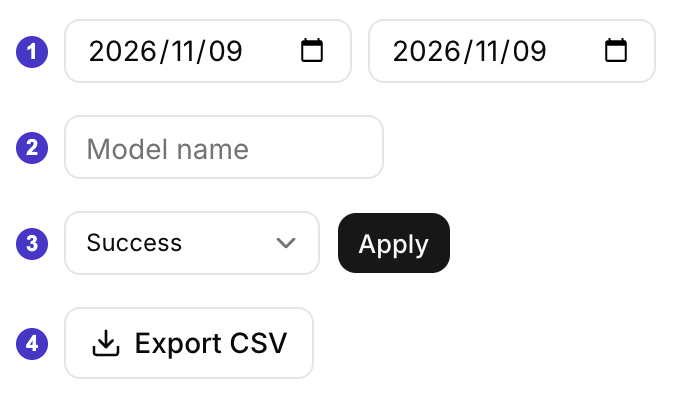
Figure 6 — Local Console filter and export controls (four real control crops stacked in sequence rather than the full toolbar): (1) date window, (2) blank Model name field, (3) Success + Apply, and (4) Export CSV. Following (1) through (4) in order ensures subagent calls stay included and the exported file matches your active filter. Open full-size image.
Practice with the Downloadable Tutorial CSV (ponytail-task-cost-demo.csv)
Download our 7-column synthetic tutorial file—Download ponytail-task-cost-demo.csv—to test the summation formulas before running your own experiment (this reduced teaching CSV is arithmetic practice data, not a full account export or a Ponytail benchmark).
The file has 7 columns (A = example_type, B = created_at, C = model, D = api_key, E = input_tokens, F = output_tokens, G = actual_cost_usd) and 6 synthetic rows (rows 2–7, claude-sonnet-5-5, /v1/messages, cache = 0, calculated at $0.84 / $4.20 per 1M tokens):
api_key (Column D) | created_at (Column B) | input_tokens (Column E) | output_tokens (Column F) | actual_cost_usd (Column G) |
|---|---|---|---|---|
ponytail-off-demo | 2026-11-09T10:06:00Z | 10,000 | 2,000 | $0.0168 |
ponytail-off-demo | 2026-11-09T10:05:00Z | 20,000 | 4,000 | $0.0336 |
ponytail-off-demo | 2026-11-09T10:04:00Z | 10,000 | 6,000 | $0.0336 |
Run A Total (off) | Rows 2–4 | 40,000 | 12,000 | $0.0840 |
ponytail-full-demo | 2026-11-09T10:03:00Z | 8,000 | 2,000 | $0.01512 |
ponytail-full-demo | 2026-11-09T10:02:00Z | 12,000 | 3,600 | $0.0252 |
ponytail-full-demo | 2026-11-09T10:01:00Z | 12,000 | 4,000 | $0.02688 |
Run B Total (full) | Rows 5–7 | 32,000 | 9,600 | $0.0672 |
Import ponytail-task-cost-demo.csv into Excel or Google Sheets with column G (actual_cost_usd) formatted as numeric values, then paste these formulas directly:
- Run A (
ponytail-off-demo):=SUMIF(D2:D7,"ponytail-off-demo",G2:G7)→0.0840 - Run B (
ponytail-full-demo):=SUMIF(D2:D7,"ponytail-full-demo",G2:G7)→0.0672(combined 6-row total$0.1512; arithmetic difference$0.0168, or20%lower than the0.0840baseline)
When working with a full Console CSV export, replace D2:D7 and G2:G7 with the column letters and row range for api_key and actual_cost_usd in your exported sheet. Always sum actual_cost_usd (settled USD charge)—do not substitute the exported standard_cost_usd column for your settled spend. For how all four token buckets (uncached input, output, cache write, and cache read) are billed, see our Claude Code API Pricing Guide.
Compare Your Two Task Totals
The comparator below starts empty and runs entirely in your browser without uploading your numbers, keys, or notes. Enter the tutorial checksums (0.0840 for Without Ponytail and 0.0672 for With Ponytail) to verify the $0.0168 (20%) arithmetic difference, then replace them with your own settled actual_cost_usd sums:
Compare Your Two Paired Task Costs (Without vs. With Ponytail)
Start Run A with PONYTAIL_DEFAULT_MODE=off and Run B with PONYTAIL_DEFAULT_MODE=full, then compare both settled USD totals.
Use the same actual settlement source for both runs.
Use the same actual settlement source as Run A.
Enter both amounts above to see the USD difference and percentage change.
Entered amounts stay on this page and are not saved or sent anywhere.
6. Another Cost Lever for the Same Token Volume: Claude API Rates
Reducing unrequested code changes how many tokens a task consumes. Your API route determines how much you pay per million tokens for the input and output tokens your workflow still uses. Keep those two levers separate rather than adding benchmark percentages to gateway unit-rate discounts.
The table below compares Anthropic's official standard API rates with UniRoute's discounted channel (discounted) rates for claude-sonnet-5-5 and claude-opus-5-5, verified on 2026-11-09 in USD per 1,000,000 standard input and output tokens.
For both models in the table, standard input and output unit rates are 58% lower than the official standard API. This comparison applies to standard input and output on these two models and does not extrapolate to subscriptions, all models, or prompt-cache buckets:
| Model | Official Standard API (In / Out) | UniRoute Discounted (In / Out) | Unit Rate Difference |
|---|---|---|---|
Claude Sonnet 5.5 (claude-sonnet-5-5) | $2 / $10 | $0.84 / $4.20 | 58% lower |
Claude Opus 5.5 (claude-opus-5-5) | $4 / $20 | $1.68 / $8.40 | 58% lower |
Enable the Discounted Channel per Model
- Select the discounted channel in Channel Management: Open Channel Management in the UniRoute Console (Channel Management Guide) and click the provider discounted channel for
claude-sonnet-5-5andclaude-opus-5-5. Clicking an option saves your per-model preference immediately and displays a confirmation toast (uniroute-setupwrites local client connection settings and does not automatically switch your account's channel routing). - Verify settled charges in Detailed records: Run your workflow and confirm the active model and settled
Actual cost(actual_cost_usdin CSV exports) in the Console.
7. Turn Off or Uninstall Ponytail, Command Reference & FAQ
Turn Off Temporarily or Change the Default Startup Mode
- Current session only: Send
/ponytail offin the Claude Code prompt box (PONYTAIL MODE OFF). - Every new session: Set
PONYTAIL_DEFAULT_MODE(lite,full,ultra, oroff) in your shell environment, or set"defaultMode"in~/.config/ponytail/config.json(%APPDATA%\ponytail\config.jsonon Windows).
Full Uninstall: Run uninstall.js Before /plugin remove ponytail
Per the official INSTALL.md, running /plugin remove ponytail first deletes the plugin directory itself—including scripts/uninstall.js—leaving behind external state files. Always clean up in this two-step order:
- Clean up external state in your system terminal: Find
installPathfromclaude plugin list --json,cdinto that plugin directory (or into a standalonegit cloneofdietrichgebert/ponytail, replacing/path/to/ponytail-installPathwith your actual path), and runscripts/uninstall.js:
claude plugin list --json
cd /path/to/ponytail-installPath
node scripts/uninstall.js
In our isolated v5.3.3 cleanup verification, node scripts/uninstall.js removes only Ponytail's own external state (~/.claude/.ponytail-active, ~/.claude/.ponytail-statusline-nudged, ~/.claude/ponytail-modes, ~/.config/ponytail/config.json, ~/.claude/ponytail-statusline.sh or .ps1, and Ponytail's statusLine segment in ~/.claude/settings.json).
- Remove the plugin inside the Claude Code prompt box:
/plugin remove ponytail
Complete Slash-Command Reference (v5.3.3) & v5.3 band Notes
| Command | Official Behavior (v5.3.3) |
|---|---|
/ponytail | Reports the active level—or, when off, turns Ponytail back on to your configured default level (lite, full, or ultra, falling back to full if the configured default is off). |
/ponytail lite / full / ultra / off | Switches the current session to lite, full (default), ultra, or off. |
/ponytail-review | Reviews code touched by your diff for real bugs, security issues, behavior under load, missing tests, slow paths, and unnecessary code to cut. |
/ponytail-audit / /ponytail-debt | Ranks simplification and risk hotspots (/ponytail-audit) or lists shortcut: <the limit>, <when to upgrade> comments (/ponytail-debt). |
/ponytail-gain / /ponytail-help | Displays Ponytail's official benchmark scoreboard (/ponytail-gain) or prints the command reference (/ponytail-help). |
/ponytail band [on|off|import] | Toggles the optional v5.3 live status band or imports past session metrics into ~/.config/ponytail/band/. |
- v5.3
bandcompatibility (Claude Code 2.1.290+): The optional live status band above the prompt requires Claude Code2.1.290+in the Terminal CLI or Claude Desktop Code tab (it is not displayed in the VS Code chat panel, cloud sessions, orclaude -p). This version requirement applies only to the visual band, not to Ponytail's core ruleset. By default,hooks/band/metrics.tsreads the session's/costtotal since startup or/clearand stores metrics locally in~/.config/ponytail/band/. For Codex, Cursor, Windsurf, Gemini CLI, and OpenCode, seeINSTALL.md.
Frequently Asked Questions (FAQ)
Does Ponytail modify my API key, model selection, or ANTHROPIC_BASE_URL?
No. Ponytail (DietrichGebert/ponytail) only injects coding instructions through local hooks and slash commands. To route Claude Code through UniRoute, configure that separately via the Claude Code CLI Setup Guide or uniroute-setup.
Why did bare /ponytail turn Ponytail back on after I ran /ponytail off?
In Ponytail v5.3.3, running /ponytail without arguments when the session mode is off re-enables your configured default level (lite, full, or ultra, or full when your configured default is off). For a clean off baseline session, launch Claude Code with PONYTAIL_DEFAULT_MODE=off claude and do not run bare /ponytail.
Do /ponytail-gain or /cost show my settled API bill?
No. /ponytail-gain displays Ponytail's official benchmark scoreboard, and /cost shows a local client session estimate. To verify settled per-request USD charges across a multi-call coding task, export CSV from the UniRoute Console and sum actual_cost_usd by api_key.